Lightweight · free · no account

Roblox Lag Fix
Removes the frame cap.

Your Roblox is locked to 60 frames per second—even if your old laptop struggles to keep up. This free tool unlocks that cap, clears out cached junk, and gives the game higher CPU priority so tired hardware actually feels the difference. One click to boost, one click to undo.

Completely free for WindowsCompletely reversibleFree foreverv2.1
Unlocks 60 FPS capClears Roblox cacheRaises CPU priorityFully reversibleInstalls with Windows installer
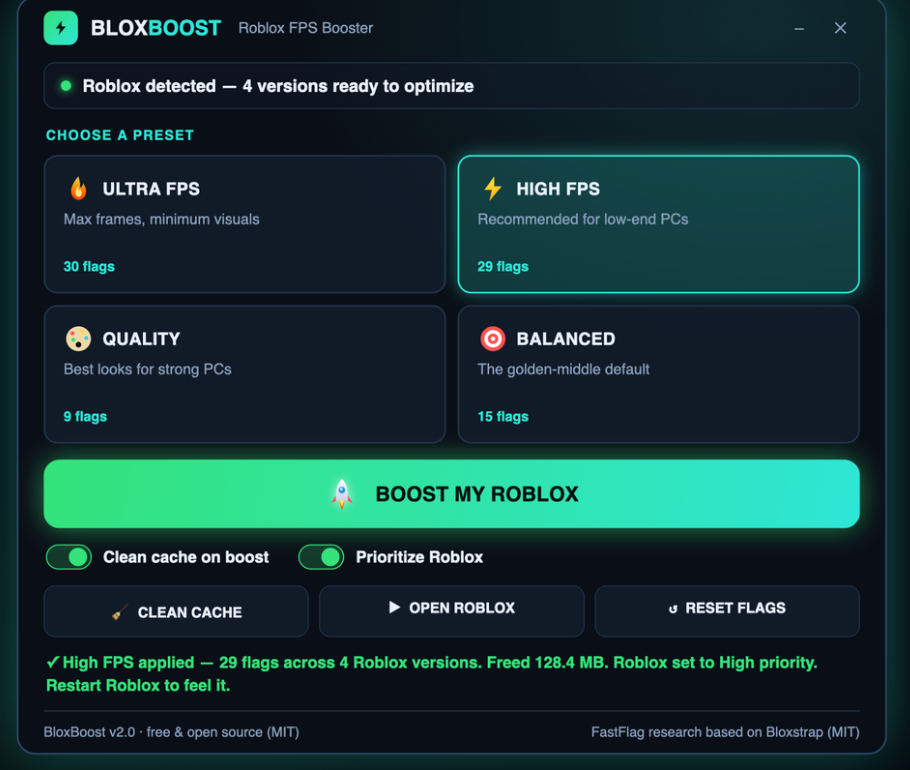
Roblox Lag Fix app window on Windows
Why it matters

Why this works better than hoping for an update.

Most lag fixes are websites, tweaking guides that don't stick, or mods you don't trust. This is local, transparent, and one button.

Technical details

What you are downloading.

Version2.1
PlatformWindows 10 and 11, 64-bit
InstallQuick download, no account
LicenseMIT, source on GitHub
PriceFree, no account
LanguageEnglish
Get started

How to fix Roblox lag in four steps.

Pick a preset that matches your machine, hit the boost button, and launch the game.

You asked

Common questions about the lag fix.

Will this get me banned from Roblox?

The tool changes local graphics and frame-rate settings and clears the cache. It does not inject code into the game or touch your account. Roblox sets its own rules on client settings, so check them if you are unsure.

Does it slow down my PC when I'm not playing?

No. Close the window and the process ends. There is no background service, no tray icon, nothing sitting in memory. Once you close it, it's gone.

What if I want to go back to normal Roblox?

Press the Reset button and every change is undone instantly. Your Roblox returns to its original state before the next time you launch the app.

Will it work on my old laptop?

If it runs Windows 10 or 11, yes. The Ultra preset is built specifically for machines that are barely holding on. Even integrated GPUs will see a difference once the frame cap is gone and lighting is simplified.

Do I need to download anything else?

No. One download has everything: open the zip, run the installer, and the app is ready.

What's the difference between the presets?

Ultra removes the cap entirely and uses the simplest lighting for maximum frames. High caps at 360 FPS and is the most popular choice. Balanced is smoother with better lighting. Quality is for strong machines and preserves the full visual style.

Can I switch between presets?

Yes. Pick a new preset any time and click Boost My Roblox again. The app resets to vanilla first, then applies the new preset, so no old settings conflict.
Real results
Inside the appRoblox Lag Fix window

See what changing the frame cap actually does.

When you unlock Roblox's frame limiter, older machines stop wasting CPU cycles on frames you never see. The presets give you four different balances—from bare-bones smoothness on potato laptops to full lighting on stronger builds.

Ultra presetRemoves the cap entirely, strips down lighting to Voxel mode, and is built for machines that need every frame they can get.
High presetCaps at 360 FPS with Voxel lighting—the sweet spot for low-end PCs that want both playability and a visible boost.
Reset buttonTakes Roblox back to its original state in one tap, so you can test presets or go back to vanilla without any leftover changes.
vs. guides

Why not just use a guide or tweaking site.

Those exist, but they're manual, they forget to include the cache wipe, and you never know if the changes stuck.

 Roblox Lag FixOnline tweaking guides
Speed to fixOne clickTwenty registry edits
Cache cleaningIncludedYou do it yourself
Process priorityApplied instantlyManual task scheduler
Undo if neededOne buttonRedo it all again
Works offlineYes, alwaysNeed to bookmark it
No account requiredCorrectSome ask for login

Stop leaving frames on the table.

Download the app, pick the preset that matches your machine, and see how much smoother Roblox feels when your weak PC is not fighting the 60 FPS cap.

Download for Windows
Latest release · v2.1

Roblox Lag Fix guides